Beat the House on Apple Watch
A fast practice companion, not the app made small. Everything the wrist is good at, and nothing it isn't.
What you are, and one button to get better at it.
Your current rating, your accuracy, and how much recent play stands behind it. Then a single button.
The figure is your current rating, never a lifetime one. A player is who they are now, not who they were while learning.
Installing
- Install Beat the House on your iPhone.
- Open the Watch app on the iPhone and scroll to Available Apps.
- Tap Install next to Beat the House.
If Automatic App Install is enabled, Beat the House may appear on your watch automatically. If it does not, use the three steps above.
Launch from your watch face
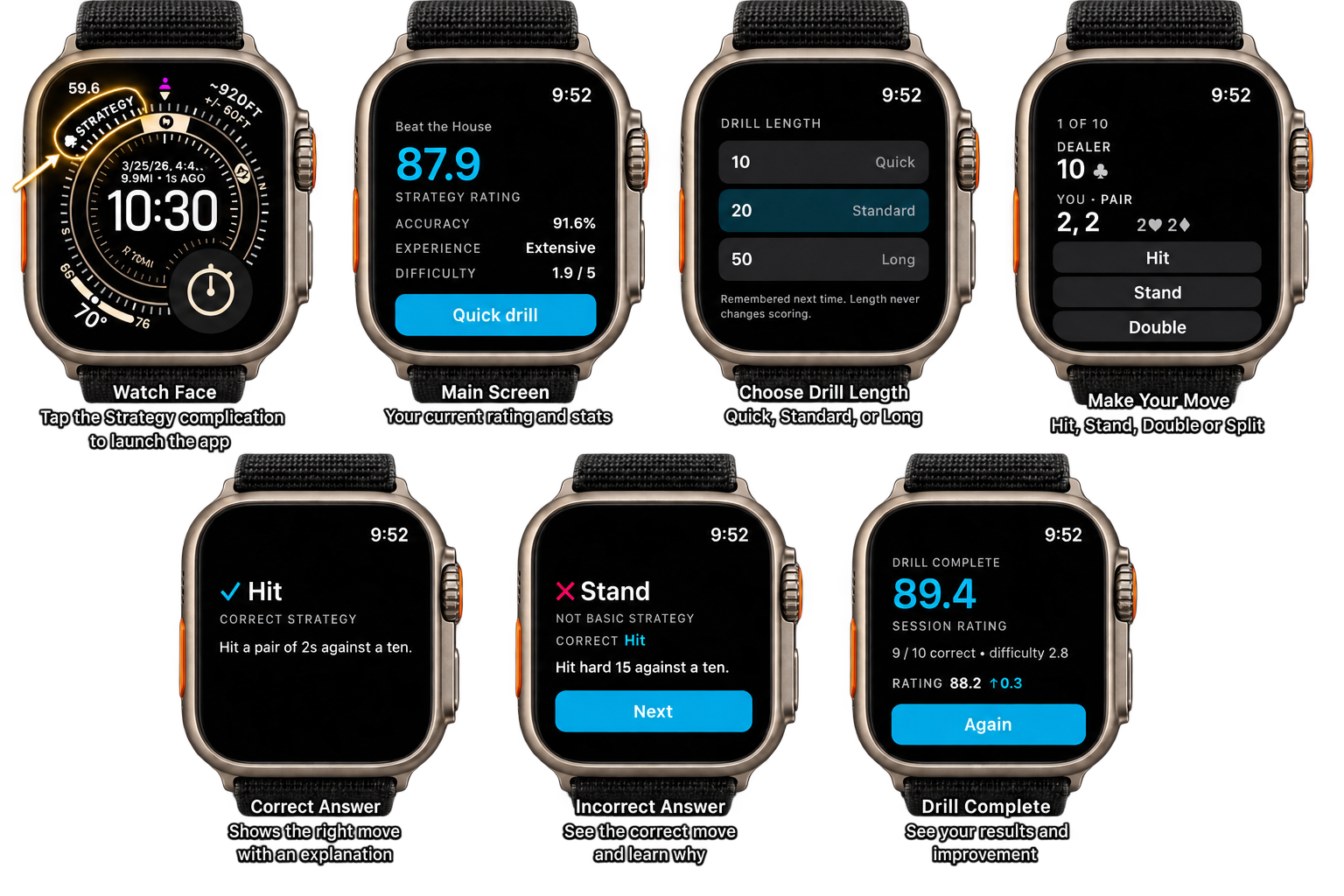
Beat the House ships a complication called Strategy Rating. Put it on a face you already use and it sits there as a spade and your current rating, and one tap on it starts a drill.
- Touch and hold your watch face, then tap Edit.
- Swipe to Complications and tap a slot.
- Choose Beat the House, then Strategy Rating.
It fits the circular, corner, inline and rectangular slots. Tapping it goes straight to the first decision of a drill. Never a menu, never a splash. The first time only, it asks how long you want drills to be, and remembers the answer from then on.
One decision per screen, always.
The question
The dealer's upcard, your hand, and only the actions that are legal. No greyed-out buttons: on a screen that size a disabled control is still a target your thumb finds.
The answer
A tick or a cross, the correct play, and one line of why, with a haptic to match. Correct answers clear themselves and move on. A miss waits for you, because the correction is the entire point.
The length
Ten, twenty or fifty decisions, twenty by default, which is long enough to mean something and short enough to finish standing in a queue. Asked once, then remembered.
Length never changes scoring. A decision in a ten-question drill is worth exactly what a decision in a fifty-question one is worth, and exactly what the same decision on the phone is worth. There is no wrist bonus and no short-session penalty.
Two hands, still one decision per screen.
A split is the one moment the wrist has to hold two things at once. Rather than shrink both hands to fit side by side (which is precisely what gets misread at a glance), the drill queues them and plays them in order, exactly as a dealer would.
A bar under the header says which hand is live, and a note reminds you how the previous one finished. Re-splits are played out too, up to the same cap the table allows.
The counter counts decisions, not hands, so a split naturally spends more of your twenty. That is the honest accounting: playing out two hands is two hands' worth of practice.
Drill on a plane, in a lift, anywhere.
The strategy chart lives on the watch, so a drill needs nothing else awake. Decisions are saved the moment you make them and sync themselves when your phone is next in range. You do not have to open anything.
Until they land, the summary says so honestly: "20 decisions saved. Your rating updates when your phone is back in range." It shows you how many you got right and how hard they were, and waits to show a rating rather than guessing at one.
Once they arrive, the drill appears in your Learning history on the phone like any other session, and moves the same rating.
What the watch deliberately leaves out
Game Play, bankroll, chips, wins and losses, the full strategy chart, session history and the tutorial all stay on the phone. A thirteen-by-ten grid cannot be read or tapped at watch size, and a drill that involved money would be measuring something other than your decisions.